Specify port number in ASP.NET Development Server
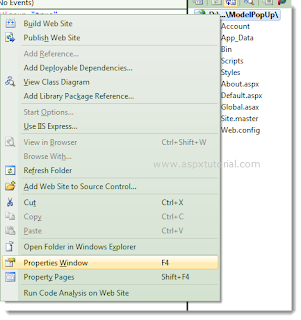
By default, the web server assigns random selected port for localhost. For example, if you have created a web site and you are going to test a page named TestPage.aspx, when you see the URL might be the following. http://localhost:4049/TestPage.aspx Following step are given below to assign a static port for the ASP.NET Development Server 1. In the Solution Explorer , right click the name of web site. 1. In the Properties pane, you will find Use dynamic ports = True , change Use dynamic ports =False . This will enable editing of the Port number property. 2. In the Properties pane, change a Port number. Now, whenever you run web site with in Visual Studio Developer , the ASP.NET Development Server will listen on the specified port.